
The Doctor’s Report turns your food diary into a clean, professional PDF you can hand to your nephrologist or dietitian. Instead of trying to remember what you ate over the past three months, your appointment starts with real data.
This feature requires KidneyPal Pro.
What the Report Is For
Most kidney appointments include some version of “So, how has your diet been?” — and most of us answer from fuzzy memory. The report answers with facts: your actual daily averages, exactly how often you went over each limit, and which foods show up most in your diet. It’s information for your care team to interpret, not a diagnosis — your doctor decides what it means for your treatment.
How to Generate a Report
- Open the Progress tab and scroll to the Doctor’s Report card.
- Tap Generate Report.
- In the Select Report Period dialog, choose one of:
- Last 30 days
- Last 90 days
- Last 6 months
- All data (covers up to the last two years of logs)
- Custom range — pick a From and To date (any span up to two years, ending today or earlier)
- Tap Generate Report to confirm.
After a moment, your device’s share sheet opens with the finished PDF. You need at least some logged days in the chosen period — if there’s nothing in that window, the report can’t be created.
Tip: If you’re not subscribed yet, the card shows a PRO badge and an Unlock button. See subscription options.
What’s Inside the PDF
Every report contains these sections, built entirely from what you’ve logged:
| Section | What it shows |
|---|---|
| Report Summary | Your name, the period, the exact date range, and how many days you tracked |
| Daily Averages vs Limits | Average sodium, potassium, phosphorus, and protein per day, each shown against your personal limit with a color-coded percentage |
| Days over limit | A count of days you exceeded each of the four limits across the period |
| Fluid Intake | Your average fluid per day against each day’s fluid number. It follows the same rule as the Diary’s fluid tracker: if your fluid is restricted (or you set a fluid maximum), it counts the days you went over; otherwise the number is a goal and it counts the days you reached it |
| Weight Tracking | Starting weight, current weight, and the change over the period — only appears if you logged weight in that window (see weight tracking) |
| Blood Pressure | How many readings you took, your average, and your systolic and diastolic ranges, with a trend chart — only appears if you logged readings in that window (see blood pressure tracking). When at least one reading has a position, a Readings by position table shows the count for each position, an average once a position has 2 or more readings, and how many readings have no position |
| Lab Results | On its own page: each lab marker’s first and latest value in the period, the change between them and its typical range (out-of-range latest values highlighted), plus blood glucose (readings, average, fasting and after-meal averages, daily chart) and blood oxygen (average, lowest) summaries — only appears if you logged results in that window (see Labs). The report header also shows your most recent eGFR with its date |
| Physical Activity | How many workouts you logged, your average minutes per week, active days, and your most frequent activity — only appears if you logged workouts in that window (see activity tracking) |
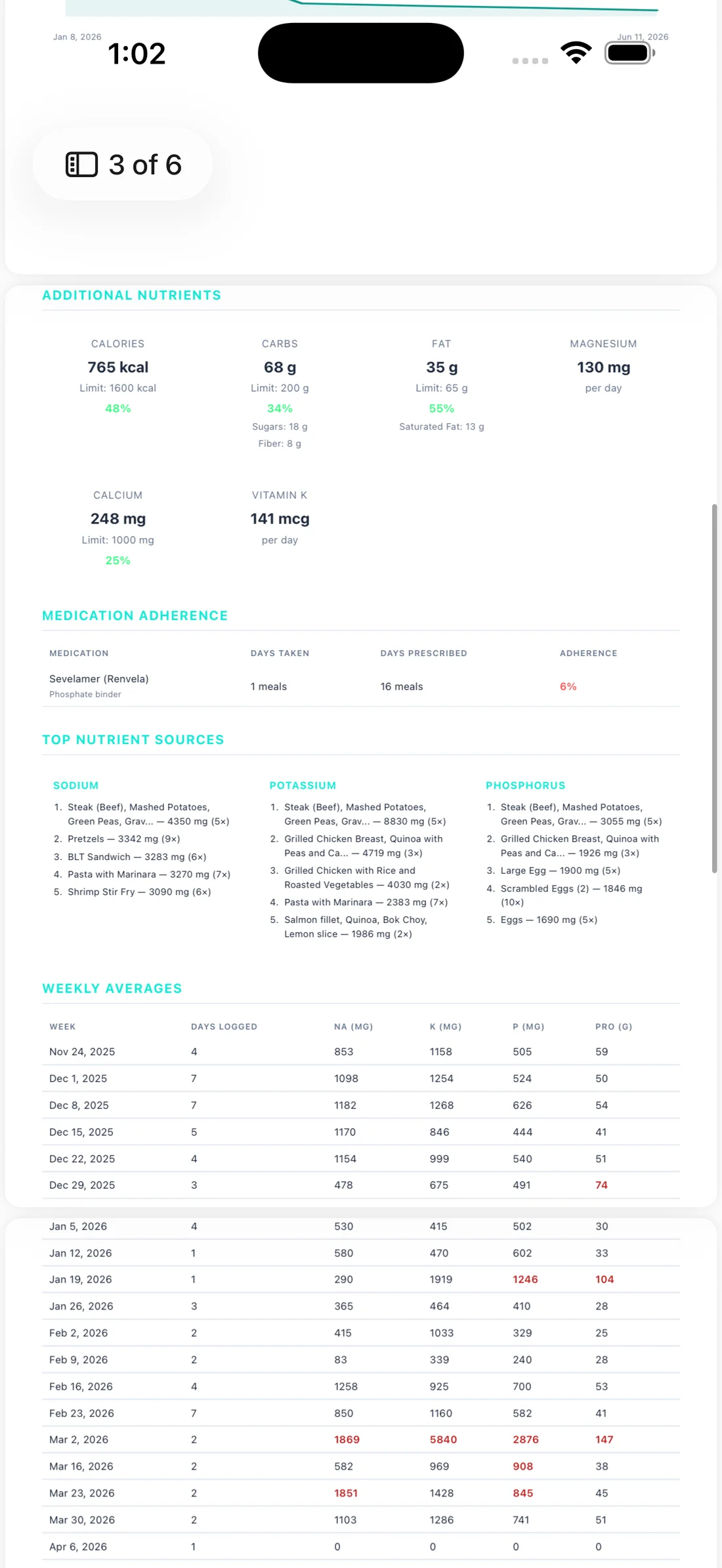
| Additional Nutrients | Daily averages for the optional nutrients you track, such as calories, carbs, fat, and magnesium. Iron is averaged over complete days only — days where every entry has an iron value — and says how many that is, for example 4.2 mg/day — average of 12 of 20 logged days; the Daily Breakdown then gets an iron column, with — on days that weren’t complete |
| Medication Adherence | If you use the binder tracker: each binder with doses taken vs. prescribed and an adherence percentage. Phosphate binders are counted per meal; potassium binders per day |
| Daily Breakdown | A day-by-day table of your nutrient totals for the whole period |
| Most Frequent Foods | Your ten most-logged foods and how many times each appeared |
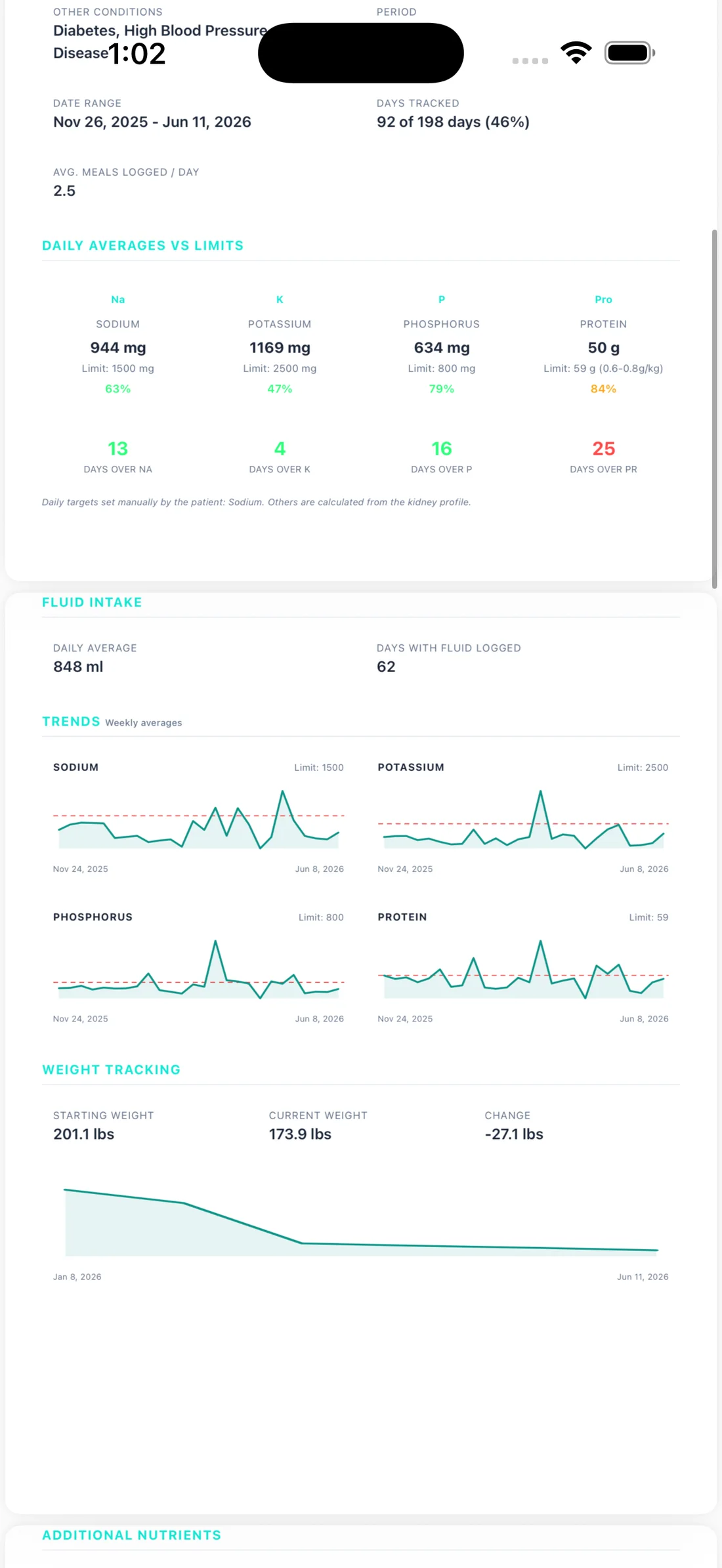
The report continues with your additional nutrients, medication adherence, the foods contributing most to each nutrient, and a week-by-week table:
The patient name at the top of the report is the name you set in Settings — the Name field is available on both mobile and the web app. If you haven’t set one, KidneyPal falls back to the name on your account, or your email address.
The limits used in the report are your own — custom limits from your doctor if you’ve entered them, otherwise the ones calculated from your kidney profile. See how limits work.
Every day is compared against the limits that applied on that day, so a target you changed half-way through the period doesn’t re-grade the days before it. When a target moved inside the reported period, that section prints a range instead of a single number — 58–65 g, for example — with the note Target changed during this period underneath. More on that in When Your Limits Change.
The PDF is produced in whatever language you have the app set to.
Sharing and Printing
The report opens straight into your device’s share sheet, so you can:
- Email it to yourself or your clinic
- AirDrop it to another device
- Save it to Files or print it at home
Your doctor will love having actual data instead of you trying to remember what you ate.
Export Your Food Log
Want every entry, not just the summary — for your dietitian, or to sort and filter it yourself? Export your food log as a spreadsheet (a CSV file that opens in Excel, Numbers, or Google Sheets). Like the report, this needs KidneyPal Pro.
- On the Progress tab, tap Generate Report on the Doctor’s Report card.
- Choose a period — the same choices as the report, up to two years (All data means the last two years).
- Tap Export food log (CSV) below the report buttons. The line under it, such as Food log: 2026-06-29 – 2026-09-26, shows exactly which dates the file will cover.
The card shows Exporting food log… with a percentage while it works; tap Cancel to stop, and no file is made. When it’s done, your share sheet opens with a file named like kidneypal-food-log-2026-06-29_to_2026-09-26.csv, so you can email it, save it to Files, or open it in a spreadsheet app. On the web app, click Download food log (CSV) next to Print / Save PDF on the Report page instead.
What’s in the file:
- One row for each food or drink you logged in the period, sorted by date. Column names follow your app language.
- Date is the diary day. Entry time is when the entry was recorded — usually when you logged it, but for drinks it’s the time you set if you edited it. It isn’t necessarily when you ate.
- Meal, Name, Items (the foods inside an entry that has two or more), Serving and Servings.
- Every nutrient — calories, sodium, potassium, phosphorus, protein, carbs, sugars, fiber, fat, saturated fat, magnesium, calcium, vitamin K, iron, and oxalate — for the amount you actually had, plus Fluid (ml), Safety Level, and Source. A value that was never recorded is left blank, not 0.
- Acid load PRAL (mEq) — if you have acid load turned on, a column after oxalate. It’s filled only when the entry’s acid load could be calculated in full; a partial or unknown value is left blank, so the column never adds up a subtotal.
Your notes and photos aren’t included. Neither is water that came in from Apple Health, since it wasn’t logged in KidneyPal — so fluid totals in the file can differ from the report. Fluid is always in ml.
The export reads your log straight from your account, so it needs an internet connection; offline, you’ll see You’re offline. Connect to the internet to export your food log. A very large period may be too big for one file — if you see Choose a shorter period, pick a shorter one.
Getting the Most Out of It
Tip: Generate a fresh report the day before each nephrology or dietitian appointment, and pick the period that matches the time since your last visit — Last 90 days if you’re seen quarterly, for example.
One honest note: the report reflects what you logged. If you tracked four days out of thirty, the averages describe those four days, not your whole month. The more consistently you log, the more useful the report becomes — the Days Tracked number on the summary tells your doctor exactly how complete the picture is.
Related
- Tracking your progress — the charts and insights behind the report
- Weight tracking — feed the weight section of your report
- Blood pressure tracking — feed the blood pressure section
- Activity tracking — feed the physical activity section
- Binder tracker — feed the medication adherence section