
Every score, ring, and piece of advice in KidneyPal is measured against your personal daily nutrient limits. This page explains which nutrients the app tracks, how your limits are calculated, and how to override them with the numbers your doctor gives you.
The Five Core Nutrients
KidneyPal tracks these for everyone, on every meal:
| Nutrient | Why it matters for kidneys |
|---|---|
| Sodium | Raises blood pressure and causes fluid retention, both of which strain the kidneys. It hides in processed food, bread, and restaurant meals. |
| Potassium | Weakened kidneys may not clear potassium well. Levels that climb too high can affect your heart rhythm. |
| Phosphorus | Excess phosphorus can pull calcium from bones and build up in blood vessels. Phosphate additives in packaged food are absorbed especially easily. |
| Protein | Digesting protein creates waste your kidneys must filter. Most CKD stages call for moderating protein — while dialysis usually increases protein needs. |
| Fluid | Some people, especially on dialysis, need to limit total fluid so it doesn’t build up between treatments. |
This is general education, not medical advice — your situation may differ. Always follow the numbers your care team gives you.
How Your Personal Limits Are Calculated
When you finish setup, KidneyPal calculates your daily limits from three things in your profile:
1. Your kidney status
Your stage sets the baseline. In early CKD the focus is mainly sodium control with relatively relaxed potassium and phosphorus limits. As CKD advances, all three tighten and the protein target comes down. Dialysis flips the protein guidance upward while keeping minerals controlled, and a transplant generally means more relaxed limits. If you’re on dialysis but chose Starting soon as your dialysis type, dialysis hasn’t started yet, so KidneyPal uses the CKD Stage 5 limits — protein is a maximum, not a goal — until you change the type in Settings → Kidney Status. On dialysis, protein is a goal to reach, not a limit: the Diary shows how much is still to go, and going above it is never shown as “over” (unless you entered your own protein maximum in Daily Limits — then that maximum stays a limit). Peritoneal dialysis uses a looser potassium limit (3,000 mg) until you enter your own number; PD fluid can also add a few hundred calories a day, depending on your prescription, that aren’t in your Diary — your dietitian can tell you how much. If you chose Not Sure or are tracking preventively, KidneyPal uses general healthy-eating guidelines. The baselines follow the NKF KDOQI clinical guidelines.
No diagnosis? No CKD rules. If you told KidneyPal you don’t have a kidney disease diagnosis and are using the app for prevention, CKD restrictions don’t apply to you. Your potassium and phosphorus budgets are the normal healthy-adult amounts — potassium-rich fruits and vegetables are good for you, and phosphorus from natural foods like meat, dairy, and plants isn’t a concern. The AI’s advice focuses on what matters most for prevention: sodium, and phosphate additives in processed food.
Kidney stones are treated differently — stone prevention isn’t CKD. If your status is Kidney Stones, potassium and phosphorus generally aren’t restricted, so those limits stay relaxed. The focus shifts to hydration and sodium control, moderating animal protein, and watching oxalate (see the oxalate note under Optional Nutrients below). The AI knows this too: its meal advice is framed around stone prevention — fluids, sodium, oxalate, and pairing high-oxalate foods with calcium — rather than the potassium and phosphorus rules written for CKD.
2. Your body weight
Protein recommendations are written as grams per kilogram of body weight, so KidneyPal multiplies your stage’s protein rate by your weight to get your daily gram target. If you skipped the weight question, you can add it anytime — see Settings. A weight you enter during setup, or later type in the protein editor under Daily Limits, is also saved as today’s reading in your weight history (and to Apple Health if sync is on). Changing only the unit doesn’t change your weight.
3. Your health conditions
If you selected High Blood Pressure or Heart Disease, your sodium limit is tightened further (300 mg each; it never drops below a sensible floor). Your sodium limit always follows your health conditions — in October 2026 KidneyPal corrected older profiles that had missed this adjustment. A sodium limit you entered yourself is never changed. Diabetes, gout, anemia and bone/mineral disorder don’t change your core limits; diabetes is a good reason to turn on carb tracking — see Optional Nutrients below.
Fluid is a little different: instead of a formula, the fluid tracker uses a standard daily target for your kidney status — from 1,000 ml on dialysis up to 3,000 ml for kidney stones, where drinking more is the goal (the full table is in Tracking Fluids). If your care team has given you a daily fluid restriction, add it as a custom limit (below) and it replaces the default.
Tip: Your care team’s numbers always win. KidneyPal’s calculated limits are sensible guideline-based defaults — if your nephrologist or dietitian has given you different targets, enter those as custom limits.
Custom Daily Limits
Open Settings and tap Daily Limits. Each nutrient — Sodium, Potassium, Phosphorus, Protein, and Fluid — shows its current value tagged either auto (calculated by KidneyPal) or custom (entered by you).
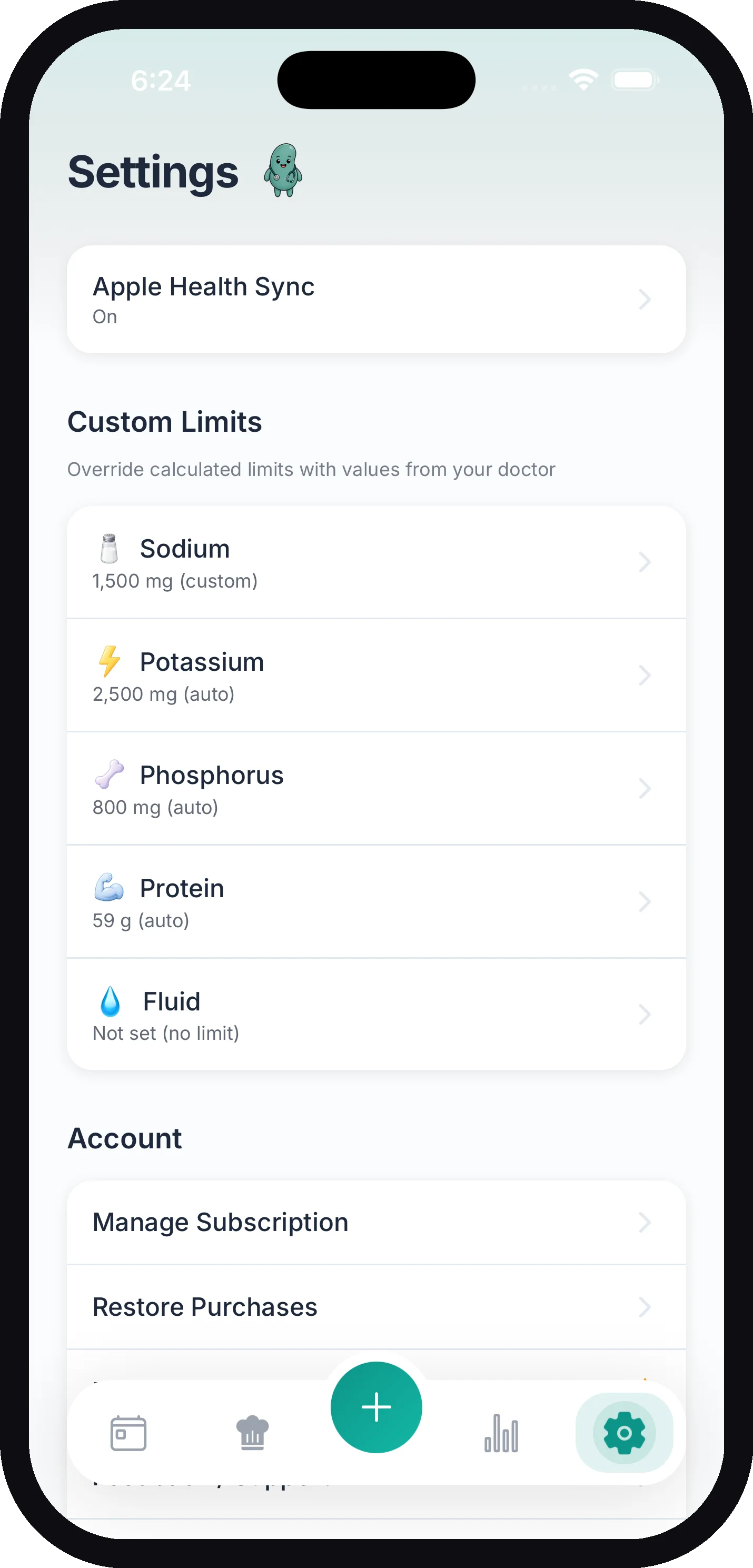
To set a custom limit:
- Tap the nutrient.
- Enter the daily maximum from your doctor, a daily minimum (optional), or both.
- Save. The new numbers immediately replace the automatic ones everywhere in the app — including the AI, whose meal scores and advice are measured against your custom numbers, not the calculated ones. They apply from today forward; days you already logged keep the limits they had, as described in When Your Limits Change.
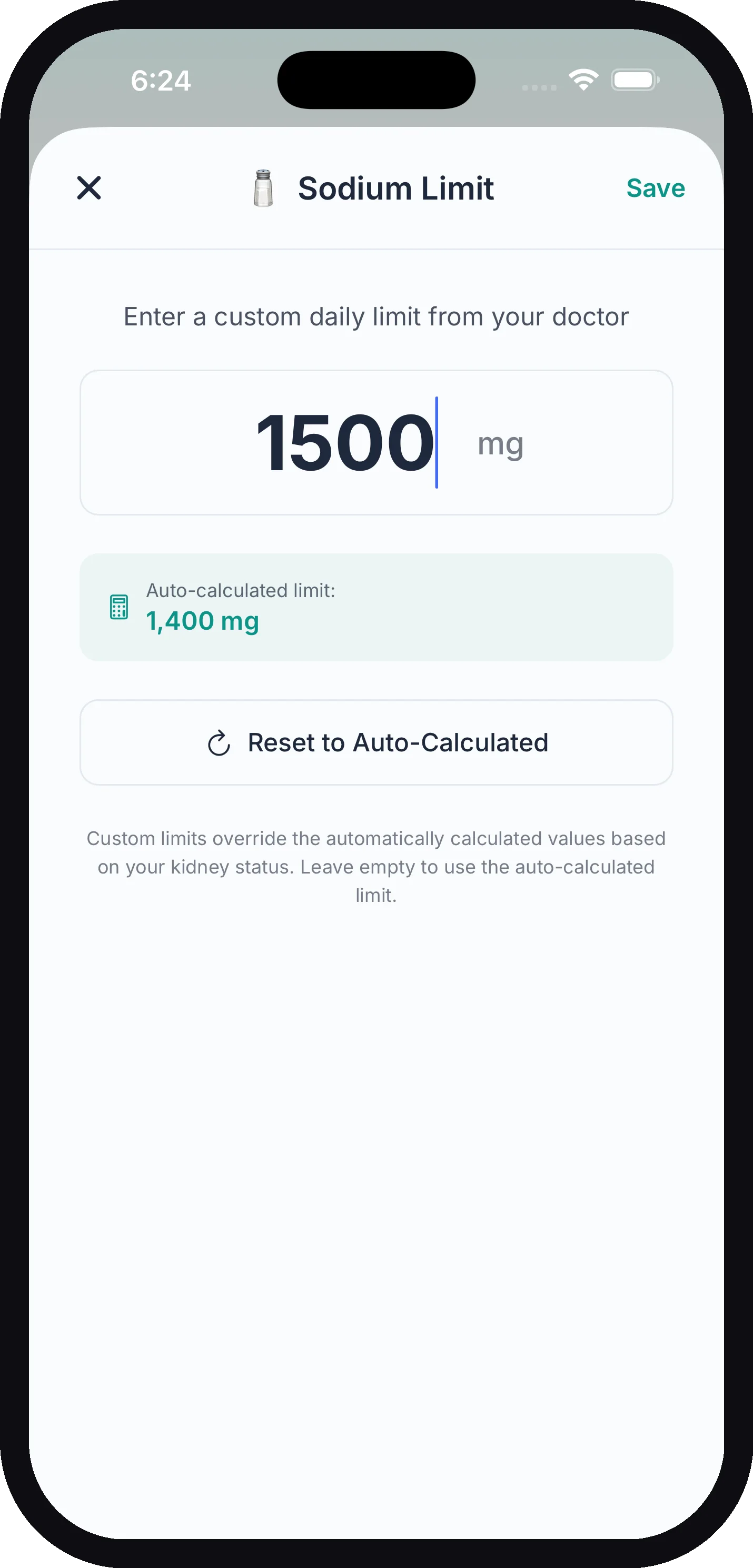
Minimums and ranges. Some care plans set a floor, not just a ceiling — a stone former told to reach a daily potassium amount, for example. Every core nutrient (and fluid) accepts a minimum as well as a maximum:
- Maximum only — the classic limit. Going over shows red and joins the “Over target” warning.
- Minimum only — leave the maximum empty. The diary card counts up to your floor (“1,200 to go”), turns green with Goal met when you reach it, is never flagged as over, and the AI stops advising you to cut that nutrient — reaching the floor becomes the goal in its advice and in the kidney score.
- Both — the bar tracks the maximum as usual, with a “Min … to go / ✓” line underneath for the floor. The doctor report prints both bounds, plus how many days you met the minimum.
To go back, open the same nutrient and tap Reset to Auto-Calculated. Leaving both fields empty also keeps the automatic limit.
Tip: Changing your kidney status in Settings resets any custom limits back to auto-calculated values for the new stage — so re-enter your doctor’s numbers afterward if they still apply.
Optional Nutrients (requires KidneyPal Pro)
Beyond the core five, Pro users can track eight more. Go to Settings → Optional Nutrients and toggle on what you want on your daily dashboard:
| Nutrient | Why you might track it |
|---|---|
| Calories | Weight management and overall energy balance |
| Carbs, Sugars & Fiber | Important for diabetic CKD — sugars and fiber show underneath total carbs |
| Fat | Heart health, with saturated fat shown as a subset |
| Magnesium | Often runs low in CKD; matters for heart, muscle, and bone |
| Calcium | Helps you watch for mineral imbalance |
| Vitamin K | Worth tracking if you take blood thinners like warfarin |
| Iron | Tracking only — an estimate of the iron in the food you log. It doesn’t measure your iron levels |
| Oxalate | The key nutrient for kidney stone prevention — found in spinach, nuts, chocolate, beets, and tea |
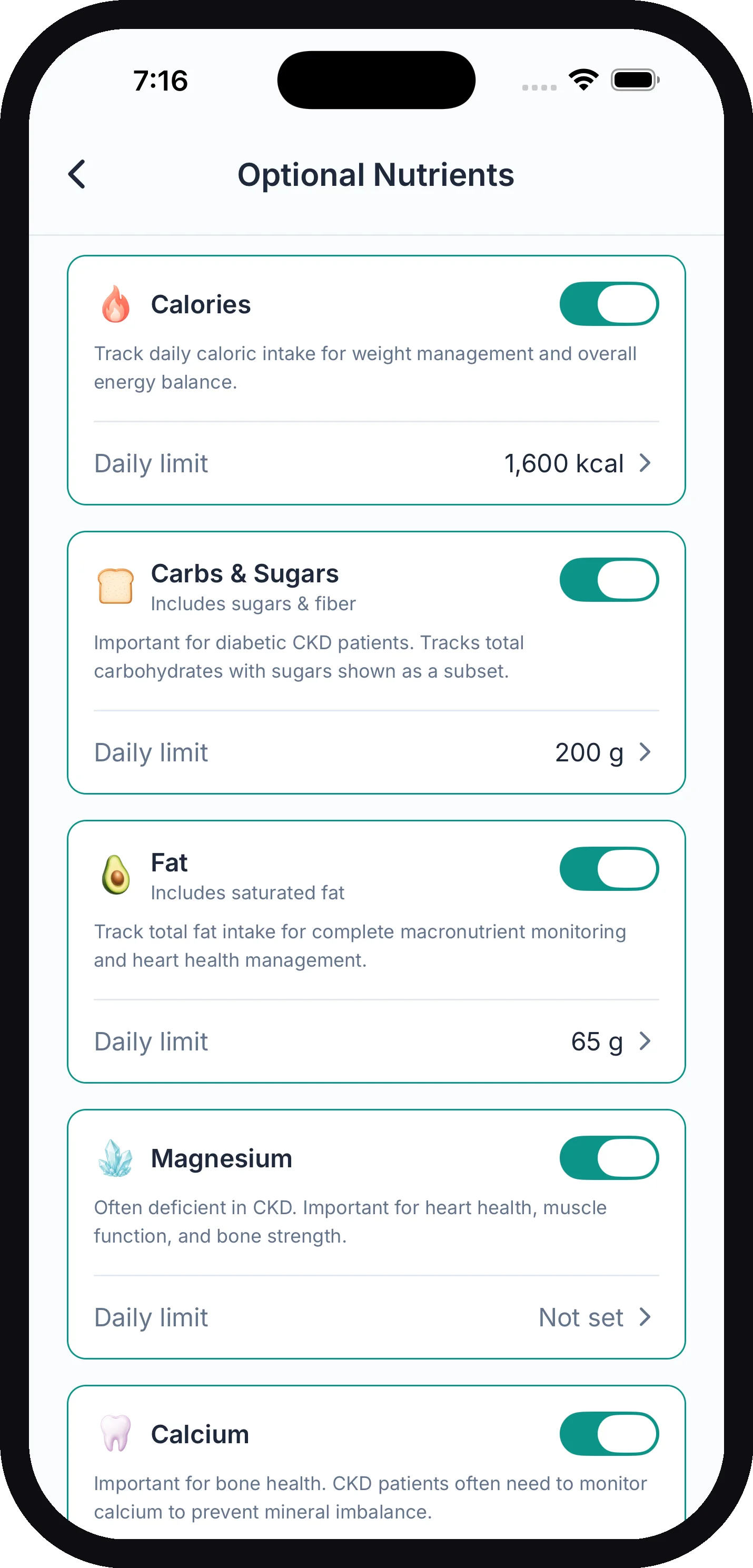
The AI already analyzes all of these on every scan — toggling a nutrient on just shows it in your diary. Each one can have an optional daily target: set one to get a progress bar and percentage, or tap Track without limit to see totals only.
Max limit, min target, or both
When you tap a nutrient’s target row, you get two fields:
- Daily maximum — stay under this amount. Going over shows the bar in red and adds the nutrient to the diary’s “Over target” warning.
- Daily minimum — aim to reach this amount. Useful for nutrients you’re trying to get enough of, such as magnesium or calcium. Set only a minimum and the card shows how much is still to go, turns green with Goal met once you reach it, and is never flagged as over — even well past 100%. Set both and the bar tracks the maximum with a “Min … to go / ✓” line underneath.
Sugars, saturated fat and oxalate accept only a maximum — a floor isn’t clinically meaningful for them.
Iron has no default target. It starts switched off, and when you turn it on it shows your daily total only. Add a minimum, a maximum, or both only if your care team gave you a number. Like oxalate, it never touches your Kidney Score. Entries logged before iron tracking was added, and foods without an iron estimate, aren’t counted — the diary says how many of the day’s entries the total covers (see Your Daily Diary).
Sugars, Fiber and Saturated Fat get their own targets, too — Sugars and Fiber appear as extra rows under the Carbs, Sugars & Fiber card and Saturated Fat under Fat. Fiber starts as a min target, the others as max limits. On the diary the Carbs card’s sub-line shows each against its target — red when sugars go over, green with a check once fiber is met — and tapping the card opens the breakdown with the bar drawn against that target.
The doctor report labels a minimum-target nutrient as min target instead of limit. Fluid already works this way for statuses where drinking more is the goal — see Tracking Fluids.
Sweeteners: monk fruit, stevia, sucralose and similar are not counted as sugar or carbs in any analysis. Allulose and sugar alcohols (erythritol, xylitol, maltitol, sorbitol) are not counted as sugar, but total carbs stay exactly as the label reports them.
A note on oxalate
Oxalate was added for people managing kidney stones, and it works a little differently from the others:
- It turns on by itself for stone formers. If your kidney status is Kidney Stones — or you have CKD and turned on I also get kidney stones in Health Conditions — oxalate tracking is enabled automatically (unless you told the app your stones are uric acid). With Kidney Stones as your status it starts with a default limit of 50 mg per day; if you have CKD and ticked stones, it starts with no limit (tracking only) until you or your care team set one. The 50 mg figure is a common target for calcium-oxalate stone prevention. You can change the limit, clear it, or turn the whole thing off like any other optional nutrient.
- Every analysis includes it. Meal photos, label scans, barcode lookups, and quick logs all return an oxalate estimate, so your daily total builds up on its own once tracking is on.
- It never touches your Kidney Score. Oxalate is tracking-only, by design — the score is built around the CKD nutrients (sodium, potassium, phosphorus, protein), so a high-oxalate food shows up clearly in your totals without skewing the score.
- It stays in KidneyPal. Apple Health has no oxalate category, so unlike your other nutrients it isn’t exported there.
When Your Limits Change
Limits don’t stay still. Your dietitian hands you a new sodium number, your kidney status changes, or your weight moves and your protein target moves with it. When that happens, the new numbers apply from today onward — every day you already logged keeps the limits it was logged under.
KidneyPal saves your limits onto each day while that day is still today. Editing Daily Limits (including a new weight typed in the protein editor, which is also saved as today’s weight reading), logging today’s weight, or changing your kidney status or health conditions updates today’s saved numbers right away, whatever day your diary happens to be showing. Yesterday and everything before it are left alone.
Those saved numbers are what every “how did that day go?” surface reads: the diary’s nutrient bars and “Over target” warning, the colored dots on the week calendar, the THIS WEEK card and trend charts on Progress, your insights, and the doctor report. A day you logged under a 2,300 mg sodium limit stays measured against 2,300 mg even after you switch to 1,500 mg, so tightening a target doesn’t turn your history red overnight.
Past days keep the targets saved that day. Days from before this existed never had their limits saved, so KidneyPal fills in an estimate from your current profile — your current limits and your current weight. It’s a sensible stand-in, not a record of the exact numbers you saw at the time. Days logged from now on are saved as they happen.
Because a stretch of days can contain more than one set of numbers, two places say so out loud:
- The doctor report prints a range instead of one figure — for example 58–65 g — with the note Target changed during this period under that section.
- The trend chart’s limit line steps to the new value on the day it changed, and a caption under the chart reads Your target changed during this period.
Where Your Limits Are Used
Your limits aren’t just numbers on a settings page — they drive the whole app:
- Diary dashboard — the Nutrient Budget shows how much of each limit you’ve used today. See Your Daily Diary.
- Kidney safety scores — the same meal scores differently for someone in Stage 2 than for someone on dialysis. See Scanning Meals.
- AI answers — meal and recipe chat answers are framed around your remaining budget for the day.
- Trends and insights — weekly charts and AI pattern insights compare your intake to your limits (requires KidneyPal Pro). See Progress & Insights.
- Doctor report — your limits and adherence appear in the PDF you can hand to your care team (requires KidneyPal Pro). See Doctor Report.