
The Recipes tab is a library of kidney-safe recipes, each one scored so you can tell at a glance how it fits your diet. You can also bring in your own recipes — from websites, cookbooks, even handwritten cards — and KidneyPal will work out the kidney-safe nutrition for you.
Browsing the Library
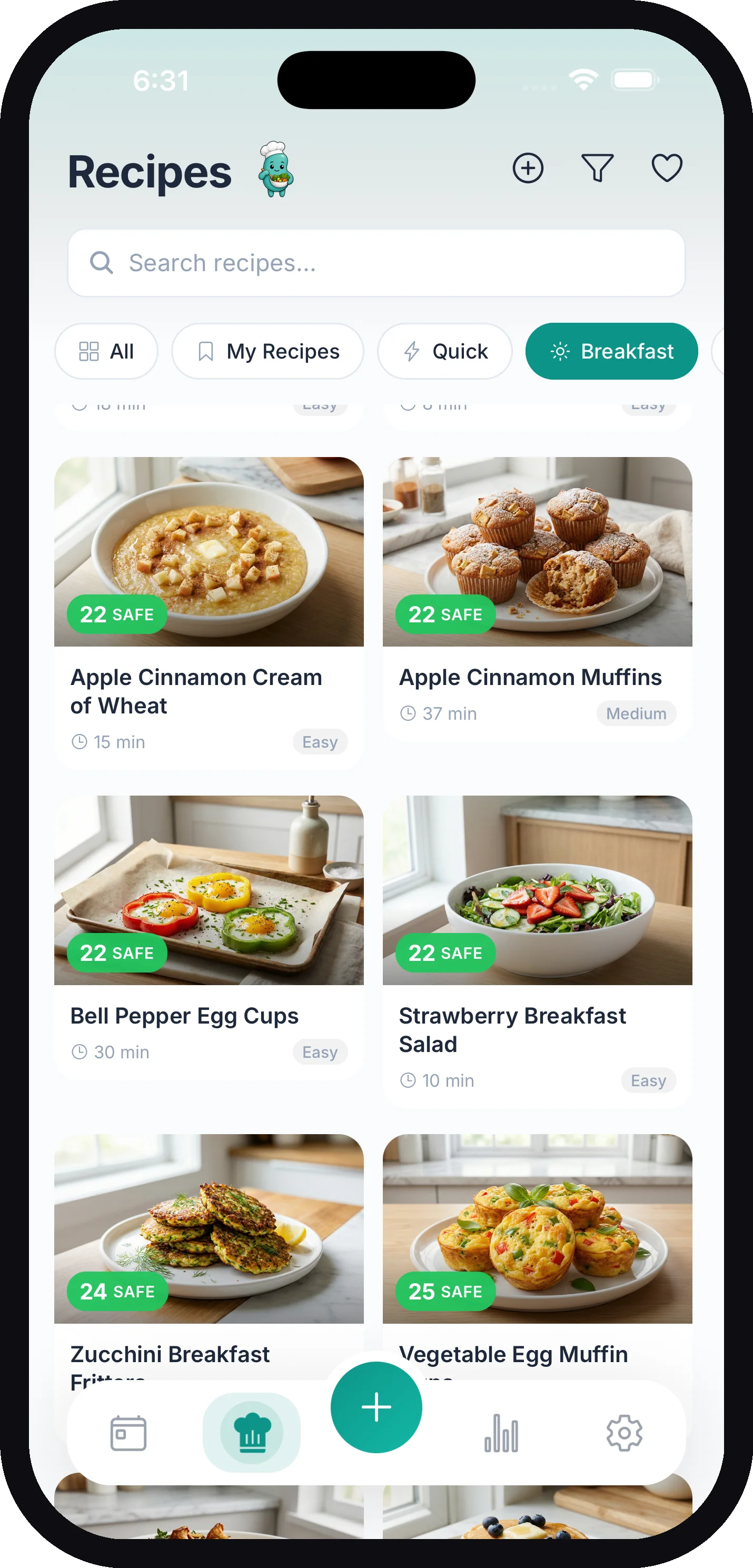
Tap the Recipes tab to browse. Each recipe card shows a kidney score badge so you can quickly tell how kidney-friendly it is.
Filters run along the top of the screen:
| Filter | What it shows |
|---|---|
| All | The full library |
| My Recipes | Recipes you’ve imported, created, or saved — including recipes someone shared with you |
| Quick | Recipes ready in 30 minutes or less |
| Soups & Sides / Air Fryer | Collections from the library. A collection appears once it has enough recipes, so you may not see both yet |
| Breakfast / Lunch / Dinner / Snacks / Dessert | By meal type |
You can also search recipes by name using the search bar.
With Foods You Often Log
Once you’ve logged the same foods a few times, the Recipes tab shows a row With foods you often log: KidneyPal recipes that use those foods, safest first. It follows your vegan or vegetarian preference, and it’s hidden while you search, on My Recipes, and when fewer than three recipes match. It’s free for everyone.
Sorting the Library
Next to the search field is a sort button (the up-and-down arrows icon). Tap it to open the Sort by sheet and choose Recommended, Name, Cook time, Sodium, Potassium, Phosphorus, or Protein.
- Recommended is the default — recipes ordered by kidney score, safest first.
- Tap the active option again to flip its direction: A-Z ↔ Z-A for Name, Fastest ↔ Slowest for Cook time, and Low ↔ High for the nutrients. The current direction shows next to the option.
- Nutrient sorts compare the numbers per serving — as the sheet notes, “Nutrient sorting uses values per serving — serving sizes vary between recipes.”
Your choice is remembered, so the library opens the same way next time. Sorting works together with the filter chips and search.
The web app has the same options in a dropdown next to the search field, with an arrow button beside it that flips the direction.
Tip: Tap the funnel icon at the top of the Recipes tab to set your Diet Preferences (Vegetarian, Gluten-Free, Dairy-Free, and more). The library filters itself automatically so you only see recipes you can actually eat. Diet preferences don’t change your nutrient limits — just what’s suggested.
Vegetarian and Vegan filter every chip of KidneyPal recipes — the meal chips, Quick, New and the collections — and a vegan recipe counts as vegetarian. My Recipes always shows all of your own recipes, and a search by name looks through every recipe.
How Recipes Are Scored
Every recipe carries a kidney score from 0 to 100 — lower is better:
| Badge | Score | Meaning |
|---|---|---|
| Safe (green) | 0–30 | A kidney-friendly choice |
| Moderate (amber) | 31–60 | Fine in sensible portions — check the details |
| High (red) | 61+ | Tough on your kidneys — look at what’s driving it |
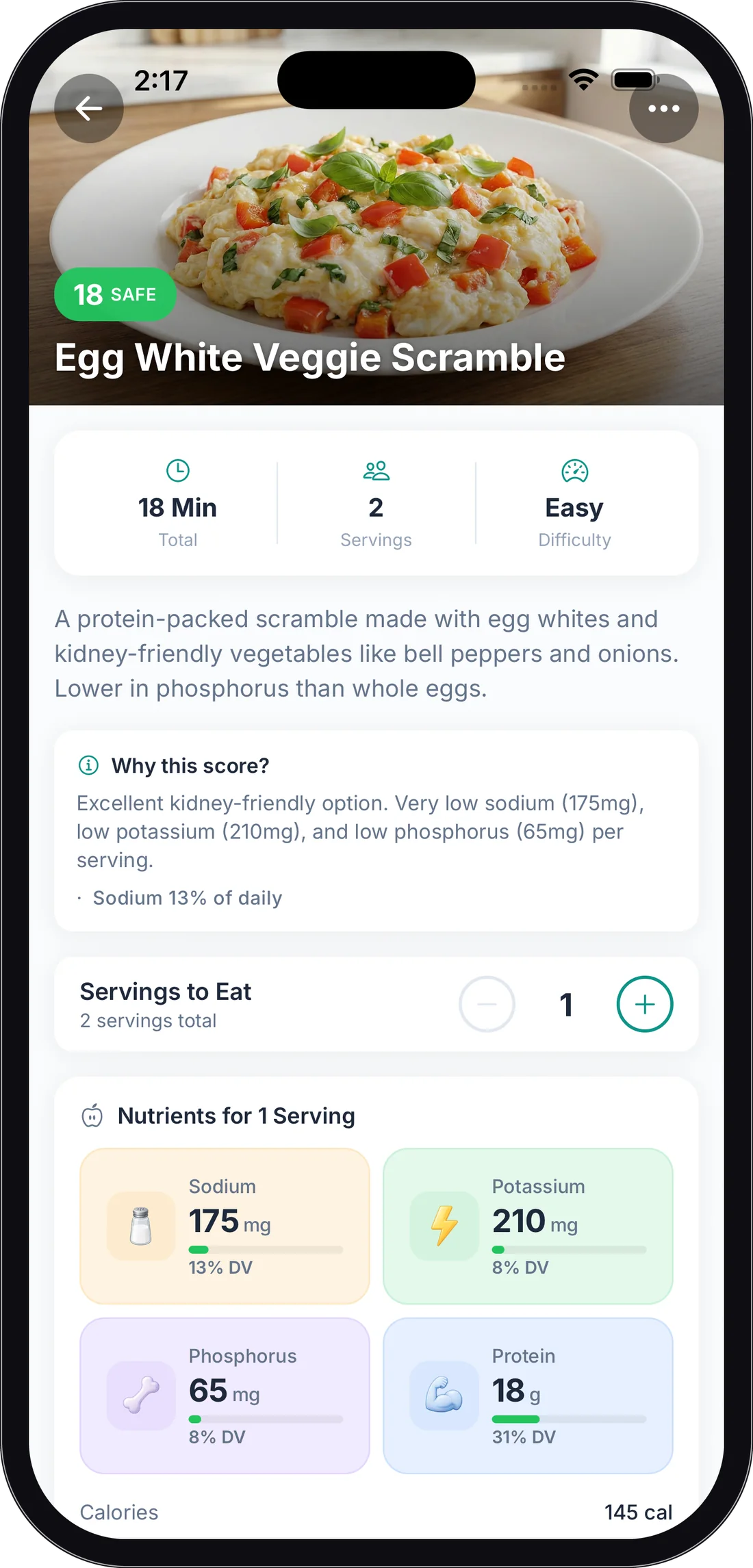
Tap into a recipe and the Why this score? card explains the reasoning. On many KidneyPal recipes the card also names the main nutrient behind the score, for example “Main nutrient in this score: Phosphorus” — these recipe scores use standard daily limits, not your personal ones. Learn how daily limits are set in Nutrient Limits.
Reading a Recipe Page
Tap any recipe to open it. From top to bottom you’ll find:
- Total time, Servings, and Difficulty at a glance
- Servings to Eat — use the + and − buttons, or tap the number to type an exact amount, to set how many servings you plan to eat. Every nutrient number updates instantly. Below one serving the − button halves the amount (1 → 1/2 → 1/4), so partial servings are a couple of taps away.
- Nutrients per Serving — sodium, potassium, phosphorus, and protein (plus any optional nutrients you track), compared against your personal daily limits. Pro members with acid load turned on also see an Acid load (PRAL) line when the recipe’s numbers allow it — see Acid Load (PRAL)
- Ingredients — each ingredient has a colored safety dot: green Safe, amber Moderate, red Limit. Ingredients with a concern show a short note explaining why. Tap the copy icon to copy the whole list for shopping. When your Servings to Eat differs from what the recipe makes, two buttons appear at the top of the list: Full recipe shows the original amounts, and My servings scales every ingredient amount to your portion — so a 4-serving recipe shows quarter amounts when you’re cooking for one. The copy icon copies whichever amounts you’re viewing. If your Food Units (Settings → Units) is Metric, or Automatic anywhere outside the US, each ingredient also shows its weight in grams after the written amount — “1 1/2 cup granulated sugar (300 g)” — scaled along with the rest when you switch to My servings. Ingredients already written in grams or millilitres aren’t repeated. With Cooking for set in Settings → Meals & Recipes, the list opens already scaled to your household and the button reads Cooking for 2 (or your number); Servings to Eat then only changes the nutrients and what Add to Diary logs. When your household matches the recipe’s yield, no buttons appear. A recipe someone shared with you works the same way.
- Instructions — numbered cooking steps
- Pro Tips — extra preparation pointers included with many recipes
What’s Free and What Needs Pro
This trips people up, so here it is precisely:
| Feature | Free | Pro |
|---|---|---|
| Browse and search every recipe | ✅ | ✅ |
| View ingredients, nutrients, and kidney score | ✅ | ✅ |
| Add to Diary | ✅ | ✅ |
| Export recipes as PDF (single and cookbook), or Send a PDF | ✅ | ✅ |
| Open a recipe someone shared, and Save to My Recipes | ✅ | ✅ |
| Share a recipe as a link and code (Send a link, Share all) | — | ✅ |
| Full cooking instructions | Your own recipes only¹ | All recipes |
| Favorites | Up to 3 | Unlimited |
| Import, create, and edit recipes (including Add from saved foods and Scan a label) | — | ✅ |
| Save to My Recipes (copy a library recipe) | — | ✅ |
| Ask About Recipe chat | — | ✅ |
¹ On recipes you didn’t create or import yourself, the Instructions section is blurred with an Unlock with Pro button. Recipes you imported or created always show their full instructions, even on the free plan.
See the full Pro comparison in Subscription & Billing.
Adding a Recipe to Your Diary
- Set Servings to Eat to what you’ll actually have
- Tap Add to Diary
- Pick the date (defaults to today) and the meal — Breakfast, Lunch, Dinner, or Snacks
- Tap Add to Diary to confirm
The nutrients for your chosen number of servings are added to your daily totals. See Your Daily Diary for what happens next.
Favorites
Found a keeper? Open the recipe, tap the ⋯ menu, and choose Add to Favorites. A red heart appears at the top of the recipe.
To see them all, tap the heart icon at the top of the Recipes tab — that opens My Favorites, a grid of everything you’ve saved.
Free accounts can keep up to 3 favorites; KidneyPal Pro removes the limit.
Importing Your Own Recipes (Pro)
Have a family recipe or one you found online? Import it and KidneyPal’s AI extracts the ingredients, calculates the nutrition, and gives it a kidney score — just like a library recipe. Requires KidneyPal Pro.
Tap the + icon at the top of the Recipes tab (or open My Recipes and tap Add a Recipe), then pick how to bring it in:
- From URL — paste a link from any recipe website
- From Photo — take or choose a photo of a cookbook page or a handwritten recipe card
- From PDF — select a PDF file from your device
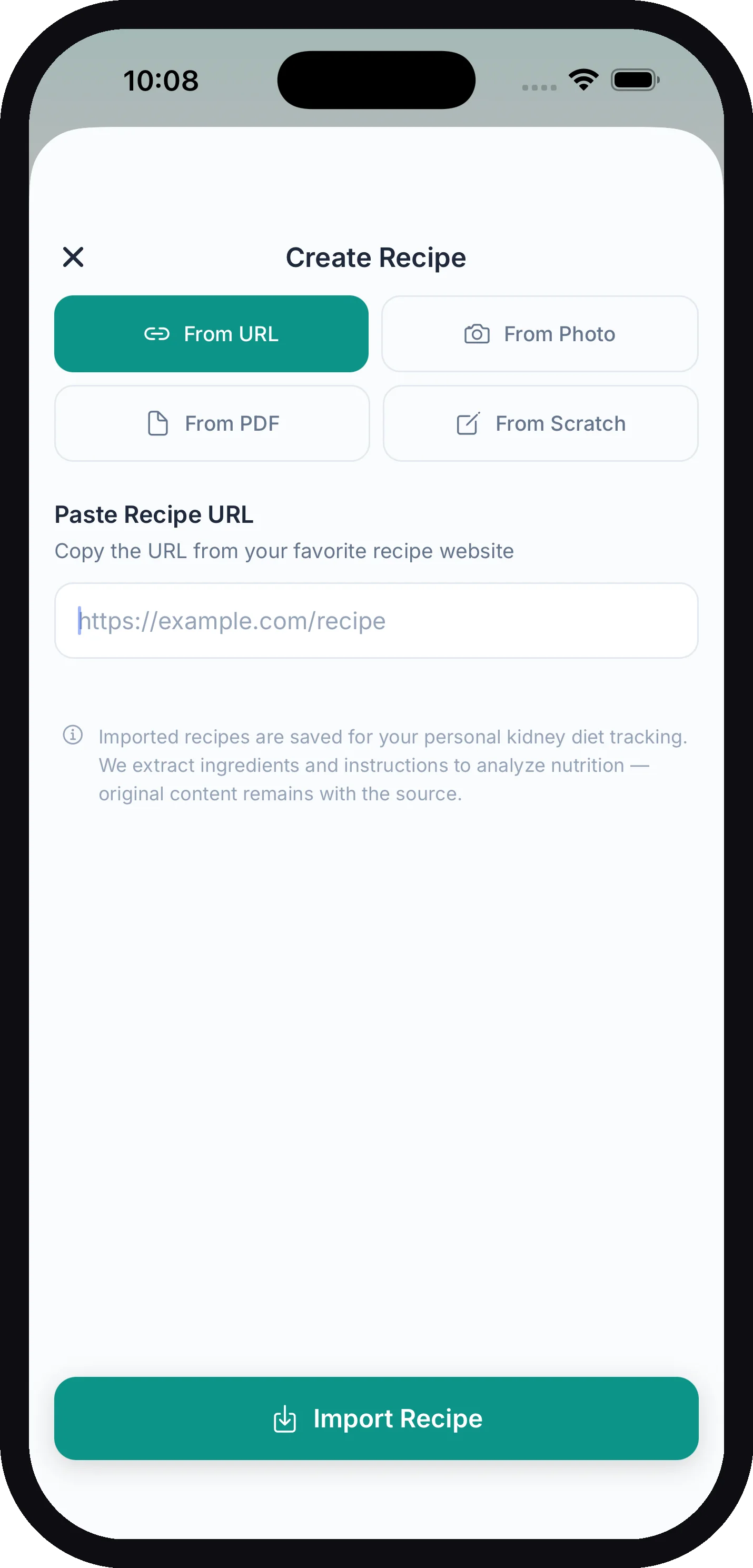
Tap Import Recipe and give it a moment — you’ll see the progress as it extracts the recipe, analyzes nutrients, and calculates the kidney score. Imported recipes land in My Recipes, show where they came from, and keep a View Original link for URL imports.
Tip: Your own imported recipes always show their full instructions — the Pro instructions lock only applies to recipes you don’t own.
Creating a Recipe From Scratch (Pro)
Choose From Scratch in the same Add a Recipe screen. Requires KidneyPal Pro.
- Enter a Recipe Title, the number of Servings, and a Meal Type
- Under Saved foods & labels, add any ingredients you already have exact numbers for (optional — see below)
- Type or paste your other Ingredients — any format works: a list, sentences, or comma-separated
- Add Instructions if you like (optional)
- Tap Calculate Nutrients — KidneyPal works out the per-serving nutrition and kidney score
- Review the numbers (tap any value to adjust it), then tap Save Recipe
Using Your Saved Foods and Labels
Above the Ingredients box, the Saved foods & labels section has two buttons:
- Add from saved foods — pick a food from your Saved Foods, then choose How much goes into the recipe? in servings of that food (“1 serving = …”) and tap Add to recipe.
- Scan a label — take or choose a photo of a nutrition label. KidneyPal reads it, lets you check the Name and the amount, and adds it as an ingredient. Nothing is logged to your diary and the photo isn’t saved.
These rows use your saved numbers as-is; anything you type in the Ingredients box is estimated. A recipe can hold up to 30 of these rows, and you can change a row’s amount or remove it at any time. A recipe can also be made only of saved foods and labels, with the Ingredients box left empty.
A recipe built this way doesn’t get a written explanation, because it would only describe the typed part. Its Why this score? card shows the main nutrient behind the score instead, for example “Sodium 18% of daily”.
Adding Ingredients to Your Shopping List
Open any recipe’s ⋯ menu and choose Add Ingredients to Shopping List. Every ingredient goes onto your shopping list with its amount, filed under its grocery category. If your Servings to Eat differs from the recipe’s yield, you’re asked whether to add amounts for the Full recipe or just My servings (Cooking for N when you’ve set a household size in Settings → Meals & Recipes), the same choice as the PDF export. Duplicates merge: two recipes that both need onions become one “onions” row with the amounts added up and a ×2 marker. A confirmation with a View list shortcut appears when it’s done. This works on every recipe and is free for everyone.
Editing Your Recipes (Pro)
You can edit any recipe you imported or created. Open it, tap the ⋯ menu, and choose Edit Recipe. You can change the title, servings, ingredients, and steps. After editing ingredients, tap Recalculate Nutrients so the nutrition and kidney score stay accurate. Saved-food and label rows can be re-amounted, removed, or added in the editor too. You can also tap any nutrient to override it manually — handy when you have exact numbers from a package. Your manual values are kept when you save; changing the ingredients afterwards clears them, and the app asks first.
The same menu lets you Add Image (your own photo of the finished dish) and Delete Recipe.
Want to tweak a recipe from the library? Choose Save to My Recipes from the ⋯ menu to make your own editable copy (Pro). Your copy is badged Your copy and sits right before the library original in lists and search. Open the copy to edit it; the original stays as it is.
Ask About Recipe (Pro)
Open the ⋯ menu on any recipe and choose Ask About Recipe to chat with the AI about it. The AI knows your kidney profile, so answers are personal to you. Try questions like:
- “Is this safe for my CKD stage?”
- “What substitutions can I make?”
- “How can I reduce the sodium?”
- “How does this fit my daily limits?”
Exporting Recipes as PDF
PDF export is free for everyone — great for printing or sharing with family who do the cooking.
- One recipe: open it, tap the ⋯ menu, choose Export as PDF, then share or save it. If your Servings to Eat is different from what the recipe makes, the app asks whether to export the Full recipe or My servings (Cooking for N when you’ve set a household size in Settings → Meals & Recipes) — the second option scales every ingredient amount to your number (a 4-serving recipe printed for 2 lists half of everything) and notes the original yield on the page. Nutrients are always per serving either way. Metric cooks (see Food Units above) get the gram weight after each ingredient in the PDF too, and Pro members with acid load turned on get an Acid load (PRAL) card for one serving whenever the recipe page shows a value for it.
- On the web: the ingredient list has the same Full recipe / My servings buttons (opening on Cooking for N when you’ve set one) and the same gram weights for metric users; Print / Save as PDF prints whichever amounts you’re viewing.
- Your whole cookbook: open the My Recipes filter and tap Export all as PDF to bundle every recipe you’ve saved into a single PDF. The button sits next to Share all and appears once you have more than one recipe.
Want to send a recipe to someone who also uses KidneyPal? You can send a link instead.
Sharing Your Recipes (Pro)
You can share any recipe in My Recipes: ones you imported, created, or saved. Open it, tap the ⋯ menu, and choose Share recipe. You’ll get two options:
- Send a link (Pro) — creates a link and an 8-character share code, then opens your share sheet with a message that includes both. The link opens the recipe in KidneyPal, and the code is a backup in case the link doesn’t open. Free accounts see Send a link (Pro).
- Send a PDF (free) — the same PDF as Export as PDF, which works for anyone, even without KidneyPal.
The person you send it to gets a copy of the recipe as it was when you shared it. Your name, email, and diary aren’t part of it. If the recipe is your saved copy of a library recipe, they see the KidneyPal library version.
Once a recipe is shared, its page shows Shared · updated with the date, and three options:
- Copy link
- Update shared copy — sends your latest changes to the same link and code
- Stop sharing — the link and code stop working. People who already saved the recipe keep their copy.
Deleting a recipe stops sharing it too. If a shared recipe is taken down after someone reports it, this row reads Removed after a report.
Share all: in My Recipes, once you have more than one recipe, Share all sits next to Export all as PDF. It creates one link and code for all your recipes. Tap it again later for Copy link, Update shared copy, or Stop sharing all. If your Pro membership ends, you can still copy or stop a link you already shared.
Opening a Recipe Someone Shared
Tap the link on a phone with KidneyPal (version 4.40 or later) and the recipe opens in the app. If you’re signed out, sign in first and the recipe opens once you’re in. If the link opens a web page instead, it shows the share code, an Open in KidneyPal button, and App Store / Google Play buttons for anyone who doesn’t have the app yet.
Have a code instead? Go to Recipes → My Recipes → Have a share code?, type the 8-character code, and tap Open recipe.
The recipe opens with a Shared with you banner and shows its ingredients, nutrients, kidney score, and full instructions. From there:
- Save to My Recipes — free for everyone, no Pro needed. The copy is yours and appears in My Recipes. If you saved it before, you’ll see Already in My Recipes with an Open button.
- Add to Diary — log it like any other recipe.
- Report this recipe — tap ⋯ and choose what’s wrong: Offensive or inappropriate, Spam or advertising, Unsafe or misleading, Copied without permission, or Something else.
A link to someone’s whole collection opens Shared recipes, with a Save all button. If the person has stopped sharing, you’ll see “This recipe is no longer shared”.