KidneyPal can connect to Apple Health so your weight, water, blood pressure, blood glucose, blood oxygen, and nutrition data stay in sync across your apps and devices. Apple Health sync is iOS only and requires KidneyPal Pro.
What Syncs
Into KidneyPal (read):
- Weight — weigh-ins from smart scales and other apps appear in your KidneyPal weight history automatically, marked with a little heart icon so you know where they came from
- Hydration — water you log in other apps counts toward your fluid tracking
- Blood Pressure — readings from your monitor’s app appear in your KidneyPal blood pressure history, also marked with the heart icon
- Workouts — workouts recorded by your Apple Watch or fitness apps appear in your activity history with their measured calories, also marked with the heart icon (import only — KidneyPal doesn’t write workouts to Health, and workouts are removed when Apple Health reports their deletion on the next sync)
- Blood Glucose and Blood Oxygen (SpO2) — readings from a glucose meter app or an Apple Watch appear on your diary tiles, the Vitals card on Progress, and each reading’s history (see Labs), marked with the heart icon; a reading deleted in the Health app is removed from KidneyPal on the next sync
Out to Apple Health (write):
- Weight you log in KidneyPal, including a weight you type in the protein editor under Settings → Daily Limits
- Hydration you log in KidneyPal
- Blood pressure readings you log in KidneyPal (pulse isn’t synced — Apple Health blood-pressure records don’t have a pulse field). A reading’s position (sitting, standing or lying down) is stored in KidneyPal and sent along with it, but the Health app doesn’t show it; readings imported from Apple Health have no position
- Blood glucose (with its before-/after-meal tag) and blood oxygen readings you log in KidneyPal
- Nutrients from your meals — sodium, potassium, phosphorus, protein, carbohydrates, fat, saturated fat, fiber, calcium, magnesium, vitamin K, iron, and calories. Iron is sent only for a day where every entry has an iron value, since Apple Health can’t show a partial total; a day with entries logged before iron tracking was added, or foods without an iron estimate, sends no iron. Once the Iron switch is on, iron goes out for each day you open in the diary — older days aren’t sent until you open them
Exports happen automatically whenever you add, edit, or delete entries. Imports happen when you open the app — when you first turn sync on, KidneyPal pulls in your last 30 days of weight, water, blood pressure, and workout history. Workout sync then follows new additions and explicit deletions, even when a tracked workout becomes older than 30 days.
Turning It On
- Go to Settings and tap Apple Health
- Turn on the Apple Health Sync toggle
- iOS shows the Health permission sheet — allow the categories you want to share
After the first sync, KidneyPal tells you how many weight and water records it imported.
Picking What to Share
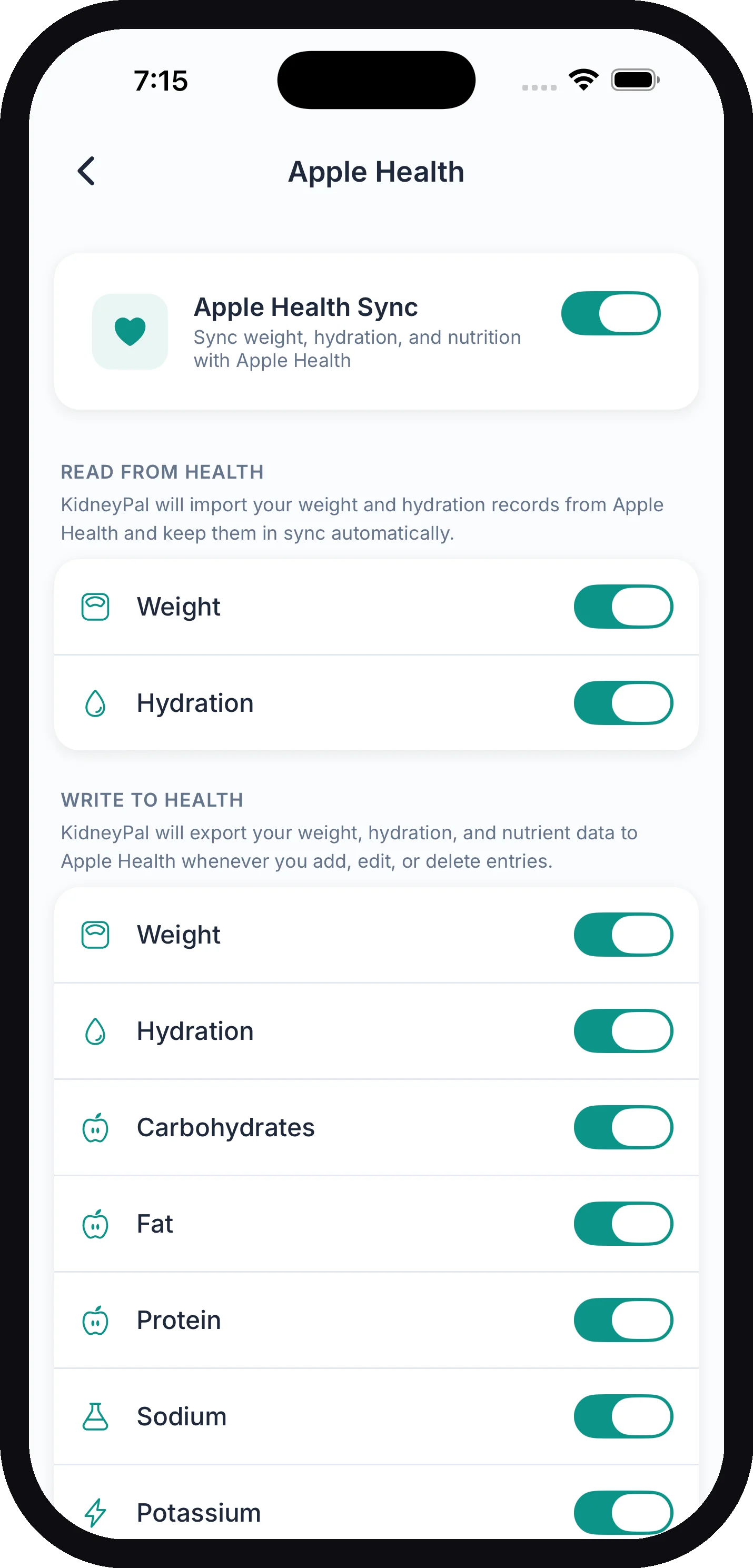
Once sync is on, the Apple Health screen shows two lists of toggles so you can choose exactly which data types to share:
- Read from Health — Weight, Hydration, Blood Pressure, Workouts, Blood Glucose, and Blood Oxygen (SpO2). KidneyPal will import these records from Apple Health and keep them in sync automatically.
- Write to Health — Weight, Hydration, Blood Pressure, Carbohydrates, Fat, Protein, Sodium, Potassium, Phosphorus, Magnesium, Calcium, Fiber, Saturated Fat, Vitamin K, Iron, Calories, Blood Glucose, and Blood Oxygen (SpO2).
Flip any of these off if there’s something you’d rather keep out of Apple Health. If you turned sync on before iron was added, Iron starts off — switch it on in the Write to Health list to send it.
If You Denied Permissions
If you said no on the iOS permission sheet, you can fix it outside the app:
- Open the iPhone Settings app
- Tap Health, then Data Access & Devices
- Tap KidneyPal and turn on the categories you want
Then reopen KidneyPal and it will sync on launch.
No Duplicates
KidneyPal recognizes its own data in Apple Health and skips it when importing, so a weight or blood pressure reading you logged in KidneyPal never comes back as a duplicate.
Tip: If a weight or blood pressure entry in KidneyPal came from Apple Health, delete it in the Health app rather than in KidneyPal — it will disappear from KidneyPal on the next sync.
What About Android?
Apple Health is only available on iOS. KidneyPal doesn’t integrate with Android’s Health Connect yet, so there’s no health sync on Android for now.
Troubleshooting
Weights from my scale aren’t showing up:
- Check that your KidneyPal Pro subscription is active — see Subscription & Billing
- Check the Read from Health toggle for Weight in Settings → Apple Health
- Check the iOS-level permissions (iPhone Settings → Health → Data Access & Devices → KidneyPal)
- Make sure your scale’s app is actually writing to Apple Health — open the Health app and look for recent weight samples
- Open KidneyPal — syncing happens when the app launches
Related Pages
- Weight Tracking — logging weight and viewing trends
- Blood Pressure Tracking — logging readings and viewing trends
- Activity Tracking — logging workouts and the weekly goal
- Fluids — tracking your daily fluid intake
- Subscription & Billing — managing KidneyPal Pro