
Welcome to KidneyPal. This page walks you through setup, explains what the app asks (and why), and shows you around the home screen so you can log your first meal with confidence.
What KidneyPal Does
KidneyPal is built around one simple loop:
- Scan your meal — take a photo, scan a label or barcode, or just describe what you ate.
- Get a kidney safety score — the AI breaks down sodium, potassium, phosphorus, and protein, scored against your personal limits.
- Log it to your diary — your daily totals update automatically.
- See the bigger picture — weekly trends, AI insights, and a doctor-ready PDF report (these require KidneyPal Pro).
You don’t need to weigh food or look anything up in tables. The app does the math; you just eat and log.
Tip: KidneyPal is an information tool, not medical advice. Always follow the numbers and guidance your care team gives you.
Setting Up Your Profile
The first time you open KidneyPal, a short setup (about 2–3 minutes) personalizes everything to you. Here’s what it asks and why it matters:
| Question | Why it matters |
|---|---|
| What brings you to KidneyPal? | Sets your primary goal so recommendations focus on what you care about |
| What’s your current kidney status? | The most important step — your stage (CKD Stage 1–5, on dialysis, and more) determines your daily sodium, potassium, phosphorus, and protein limits |
| Do you manage any of these conditions? | High blood pressure and heart disease tighten your sodium limit. If you have CKD and also get stones, tick I also get kidney stones — it adds a stone-type question and doesn’t change your limits |
| Stone type | Only asked if you get kidney stones — calcium oxalate, uric acid, or not sure. It decides whether Pro oxalate tracking starts on (see Kidney Stones) |
| What’s your current weight? | Protein limits are calculated per kilogram of body weight (you can skip this and add it later). Your answer also becomes the first reading in your weight history |
| Dialysis type | Only asked if you’re on dialysis — hemodialysis, peritoneal, home hemodialysis, or starting soon. It helps tailor your food guidance. The first three use the dialysis targets (protein is a goal to reach); Peritoneal gets a looser potassium limit, 3,000 mg, because peritoneal dialysis removes potassium every day; Starting soon uses the CKD Stage 5 limits until dialysis starts, with protein as a maximum. You can change it later in Settings → Kidney Status |
Depending on your version of setup, you may also see a few short questions about your eating habits and goals. They don’t change your limits. To see exactly how your answers become daily limits, read How Your Limits Are Calculated.
Don’t know your CKD stage? No worries — just choose Not Sure and KidneyPal uses safe, moderate limits. You can update your status anytime in Settings, or estimate your stage from a recent blood test with the built-in eGFR Calculator.
Trying a Demo Scan
Before you even create an account, setup lets you try the analyzer: snap a photo of whatever you’re eating, or type a description, and you’ll get a full kidney breakdown. It’s the best way to see what the app can do.
Creating Your Account
Near the end of setup you’ll reach the Save your profile screen. Your account keeps your kidney profile, diary, and history synced and backed up. Choose one of:
- Continue with Google
- Continue with Apple (iOS only)
- Continue with Email — enter your email and a password of at least 6 characters, then tap Create Account
Already have an account? Tap Log in at the bottom of the same screen and sign in with your email and password, or use Continue with Google / Continue with Apple if that’s how you signed up. If you enter an email that already has an account, the app switches to sign-in right there: enter that account’s password and tap Sign In (or Forgot your password?).
You don’t have to go through setup first, either: the welcome screen has a Sign In button right under Get Started, and the very first setup screen has an Already have an account? Sign In link at the bottom — handy if you reinstalled the app or switched phones.
Signing in on a new device? Right after you sign in, KidneyPal loads your profile from your account. If it can’t reach it within a few seconds, you’ll see We’re having trouble connecting — “We couldn’t reach your account yet. Check your connection and try again — your data is safe.” Tap Try again once you’re back online, or Sign out to switch accounts. You won’t be sent back through setup.
The Home Screen at a Glance
After setup, the app opens to your Daily Diary — home base for everything you log. From top to bottom:
- Week calendar — tap any day to view or edit that day’s log.
- Nutrient Budget — your daily progress for sodium, potassium, phosphorus, and protein against your personal limits. Pro users can add optional nutrients like calories and carbs.
- Fluid Intake — quick-add water, coffee, tea, and more. See Tracking Fluids.
- Meal sections — Breakfast, Lunch, Dinner, and Snacks, each with an add button offering Scan, Say or Type, Recipes, Water, Manual, and Saved. See Your Daily Diary.
- Streak — log at least one meal a day to build your streak, with milestones at 3, 7, 14, 30, 60, and 100 days.
- Weight quick log — log today’s weight in one tap. See Weight Tracking.
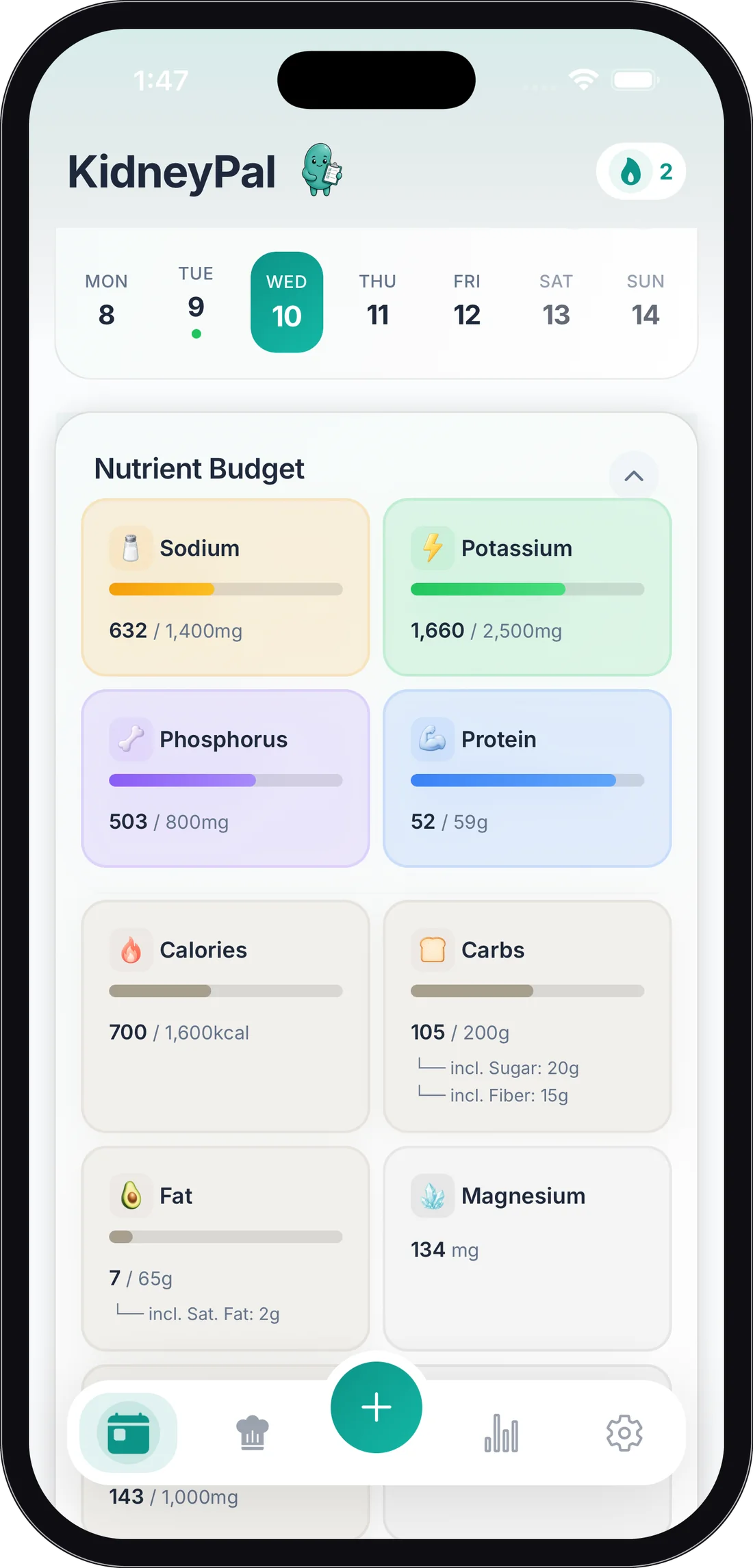
The tab bar along the bottom gets you to the camera, your recipe library (Recipes), and your progress charts (Progress & Insights).
Prefer a bigger screen? KidneyPal Pro includes a companion web app — sign in at web.kidneypal.app on any computer and your diary, recipes, and reports stay in sync with your phone. See KidneyPal on the Web.
Changing Your Language
KidneyPal works in 13 languages — English, Spanish, French, German, Portuguese, Arabic, Italian, Japanese, Korean, Dutch, Polish, Turkish, and Chinese (Traditional). Everything switches over, including what the AI says when it analyzes your meals.
To change it, go to Settings → Language and pick from the list.
Tip: Switching to or from Arabic flips the entire layout direction, so the app will ask to restart to apply it.
Your First Scan
Ready to try it for real?
- Tap the camera in the tab bar.
- Point your phone at your plate and tap the capture button.
- In a few seconds you’ll see your kidney safety score and nutrient breakdown.
- Happy with it? Tap Add to Diary and pick the meal.
The free plan includes 5 AI analyses per day (photo, label, barcode, and voice/text combined), resetting at midnight — plenty to get started. For the full walkthrough, including tips for better results, head to Scanning Meals. For plan details, see Subscription & Billing.