
The Settings tab is where you tune KidneyPal to fit you — from your kidney profile and daily limits to language, units, and your account. It’s organized into five sections: My Health, Diary & Nutrition, App, Help & About, and Account. This page walks through each in order.
One-time Pro setup
After Pro access is confirmed, KidneyPal offers a short, optional setup when your diary is ready. Existing Pro members see it once too. After saving or skipping, the setup is not offered again. Change your choices later through Settings → Optional Nutrients and Settings → Optional Tracking.
- Choose your nutrient cards. Keep the four core cards and choose any extras. All eight optional nutrient switches are shown directly. Your current choices are preselected; daily targets stay unchanged. Below them is the Acid load (PRAL) switch (information only, no limit — see Acid Load (PRAL)); Keep just my core cards turns off the extra cards but leaves this switch as it is.
- Choose what’s on your home screen. Show or hide Weight, Blood Pressure, Activity, Glucose, SpO₂ and Labs on your diary. Hiding a shortcut does not delete readings or change separate sync permissions.
Save my setup applies your changes. Back keeps the draft. Not now discards it and remembers that you skipped, so you are not asked repeatedly across devices. If saving fails, your choices remain available to retry.
Both screens remind you that these choices can be changed anytime in Settings. The popup only configures nutrient cards, the acid load line and home-screen health tiles. Units, targets, Apple Health sharing and lab-personalized guidance remain in their existing Settings flows. The same setup is available on the web.
A slow or offline setup write that has not settled after eight seconds offers a Close action. The app explains that queued changes may still sync when connectivity returns; check Settings before submitting another setup. Closing does not claim to cancel a queued Firestore write.
My Health
This section holds the medical details that personalize the entire app.
Kidney Status
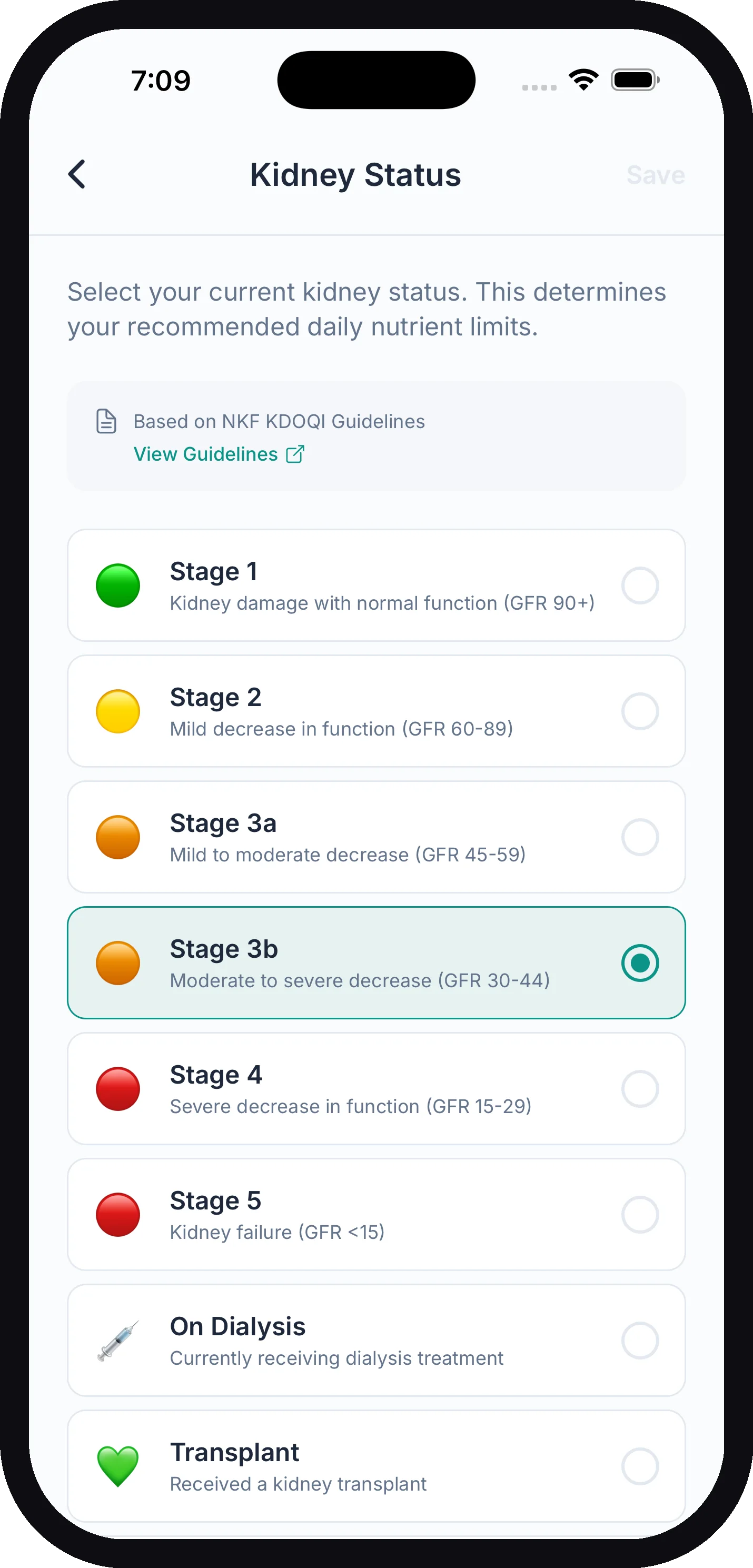
Tap Kidney Status to change your stage. Options are:
| Option | Description shown in the app |
|---|---|
| Stage 1 | Kidney damage with normal function (GFR 90+) |
| Stage 2 | Mild decrease in function (GFR 60–89) |
| Stage 3a | Mild to moderate decrease (GFR 45–59) |
| Stage 3b | Moderate to severe decrease (GFR 30–44) |
| Stage 4 | Severe decrease in function (GFR 15–29) |
| Stage 5 | Kidney failure (GFR <15) |
| On Dialysis | Currently receiving dialysis treatment |
| Transplant | Received a kidney transplant |
| Kidney Stones | Managing or preventing kidney stones |
| Proactive Health | No diagnosis, taking preventive measures |
| Not Sure | Exploring options, not yet diagnosed |
Saving a new status immediately recalculates your daily nutrient limits for the new stage (based on NKF KDOQI guidelines — there’s a View Guidelines link on the screen).
Dialysis type. When On Dialysis is selected, a What type of dialysis are you on? picker appears under the list: Hemodialysis (HD), Peritoneal dialysis (PD), Home hemodialysis, or Starting soon. It helps tailor your food guidance and shows on your doctor report. Starting soon also sets your limits: until dialysis starts, KidneyPal uses the CKD Stage 5 limits, with protein as a maximum, and the Stage 5 fluid limit (1,200 ml). When you start dialysis, change this to your dialysis type and the dialysis defaults come back right away. Peritoneal dialysis uses the dialysis defaults with a looser potassium limit, 3,000 mg (peritoneal dialysis removes potassium every day, and low potassium is common on it), until you enter the number from your dialysis team in Daily Limits. Changing only the type never resets custom limits — numbers you or your doctor entered stay as they are, and days you already logged keep their limits. If you move off dialysis, the type is removed. On the web app the picker appears in the same sheet.
Tip: Changing your status resets any custom limits back to auto-calculated values. If your doctor gave you specific numbers, re-enter them under Daily Limits afterward.
Health Conditions
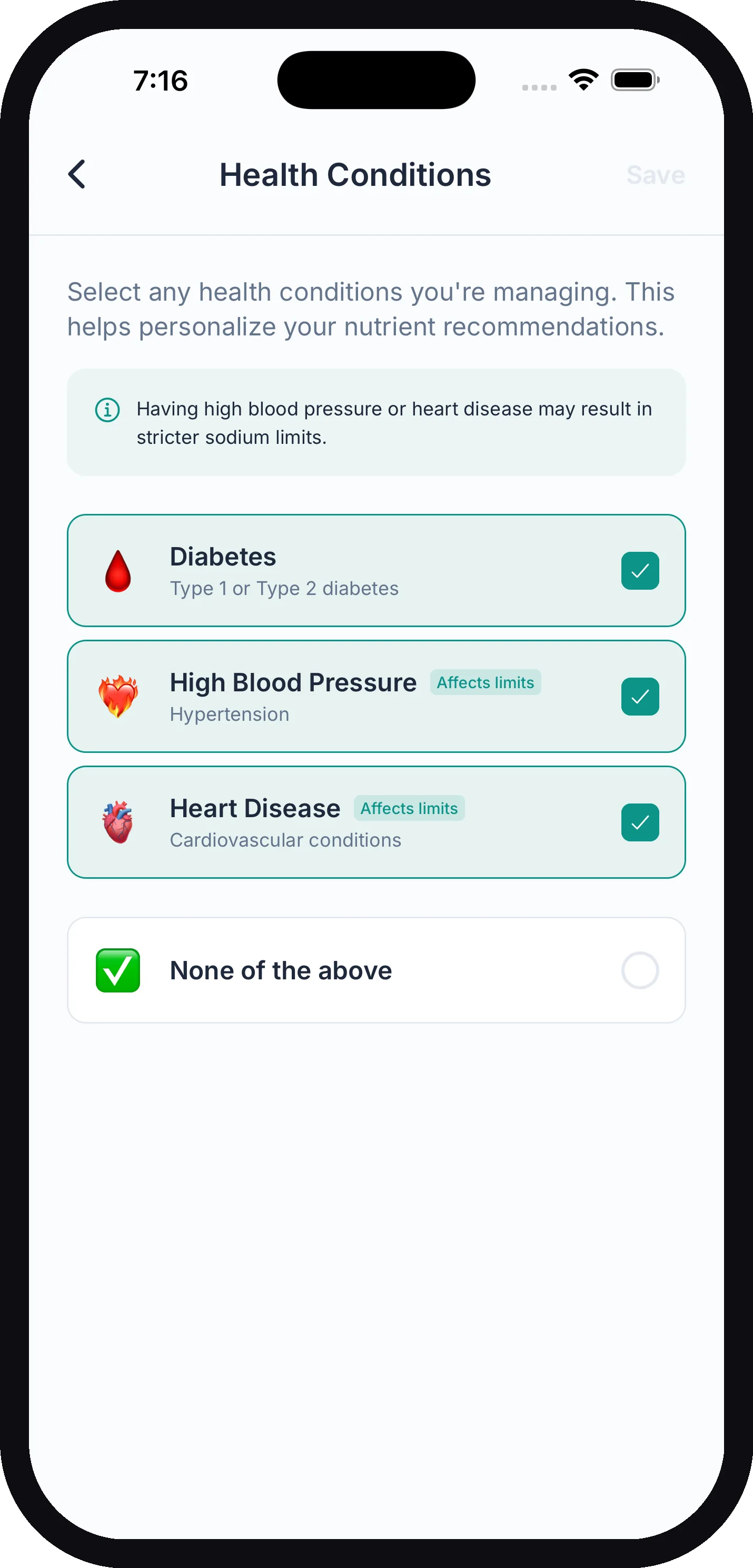
Select any conditions you’re managing:
- Diabetes (Type 1 or Type 2)
- High Blood Pressure (hypertension) — affects limits
- Heart Disease (cardiovascular conditions) — affects limits
- Gout (uric acid buildup in the joints)
- Anemia (low hemoglobin or red blood cells)
- Bone/mineral disorder (calcium, phosphorus or bone problems)
Selecting high blood pressure or heart disease tightens your daily sodium limit automatically. Diabetes, gout, anemia and bone/mineral disorder don’t change your limits. Choose None of the above if none apply. See How Your Limits Are Calculated for the details.
Below the list there’s also I also get kidney stones, for people who have CKD and get stones too. Turning it on lets you pick a stone type and switches on calcium tracking and, unless your stones are uric acid, oxalate tracking (Pro; a switch you already set yourself stays as it is) — it does not change your kidney limits or your kidney score. If stones are your only kidney concern, choose Kidney Stones under Kidney Status instead. See Kidney Stones.
eGFR Calculator
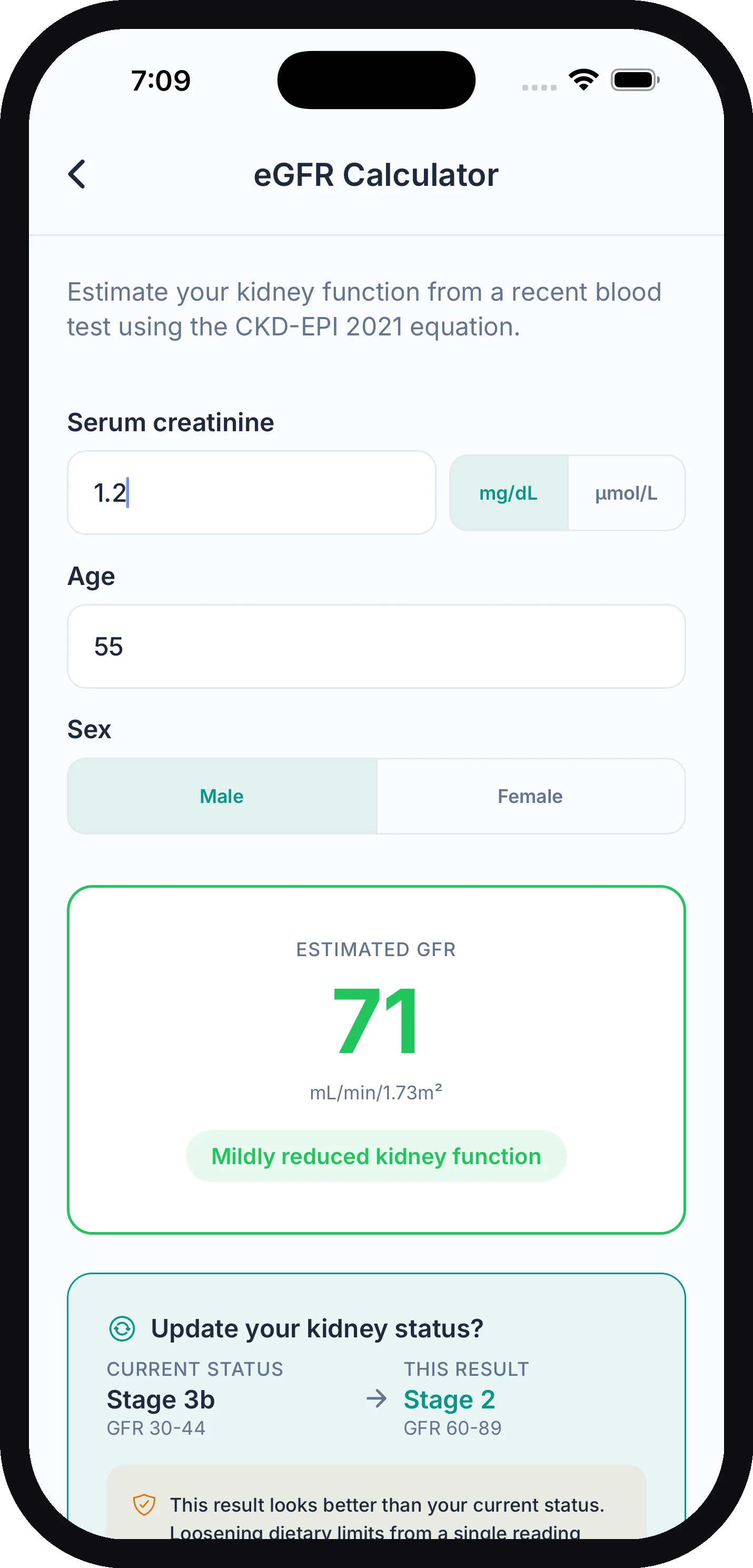
Not sure of your stage? The eGFR Calculator estimates your kidney function from a recent blood test using the CKD-EPI 2021 (race-free) equation. Enter:
- Serum creatinine — in mg/dL or µmol/L, straight from your lab report
- Age
- Sex
You’ll see your estimated GFR in mL/min/1.73m² and the approximate stage it falls into. If the result differs from your current KidneyPal status, the app offers to update it — and shows how your daily limits would change. With Proactive Health or Not Sure as your status, it offers a stage only when your eGFR is below 60, because stages 1 and 2 need more than an eGFR to diagnose. If the result looks better than your current status, KidneyPal advises confirming with your nephrologist before loosening limits, since eGFR can fluctuate between blood draws.
The calculator’s own words apply here: this is an estimate, not a medical diagnosis. Always discuss your results with your doctor or nephrologist.
Personalized Guidance
The one privacy screen for KidneyPal’s meal guidance. It lists, in three groups, exactly what the service that analyzes your meals receives:
- Always used — kidney status and dialysis, health conditions, daily limits and targets (including your doctor’s), diet preferences (including I cook without added salt) and optional nutrients, and food units. Guidance can’t work without these, so they go with every meal you analyze.
- Your choice — two switches. Use my lab results, glucose and weight is off until you turn it on: the latest value of each hand-entered lab marker except magnesium and the cholesterol panel from the last 12 months, a 30-day glucose summary (readings count and averages, never individual readings), and your latest weight with its 30-day change. Turn it off again and none of that is sent from then on. Include readings imported from Apple Health is off by default and only enabled while the first switch is on; it lets glucose and weight that came from Apple Health count toward those summaries. Apple requires your explicit permission before Health data reaches another service, which is why this one is opt-in.
- Never sent — notes on any entry, blood pressure, blood oxygen, magnesium lab results, cholesterol panel results (total cholesterol, LDL, HDL, triglycerides), individual glucose readings, and your name or email.
The row on the Settings page reads Labs, glucose & weight included or Health data off. Nothing ever pops up to ask about this; the switch lives here and on the personalization card at the bottom of the Labs hub. The guidance uses these values only to sharpen nutrient advice and never interprets your results. The screen says so plainly: personalized guidance is an informational estimate, not medical advice, and never replaces your doctor, nephrologist or dietitian. Confirm any change to your diet or treatment with your care team.
The Labs hub itself — where you log and review bloodwork — isn’t in Settings. Open it from the Labs tile on your diary or the Labs card on the Progress tab.
Binder Medications (requires KidneyPal Pro)
Set up your phosphate and potassium binders so you can check them off with each meal, and have your adherence appear in doctor reports. See Binder Tracker.
Apple Health Sync (iOS only)
On iPhone the last row in My Health is Apple Health Sync, showing On or Off. It syncs weight, hydration, and nutrition with the Health app. Advanced sync requires KidneyPal Pro. Full setup in Apple Health.
Diary & Nutrition
Daily Limits
Daily Limits lets you override KidneyPal’s calculated values with numbers from your doctor. The row on the Settings page summarizes the state — for example 1 custom · 4 automatic, or All automatic. Inside, each nutrient — Sodium, Potassium, Phosphorus, Protein, and Fluid — shows its current daily limit tagged auto or custom. Tap one to enter a custom value or reset it. The protein editor also lets you update your body weight, since your automatic protein limit is calculated from it. A weight you type there is also saved as today’s reading in your weight history (and to Apple Health if sync is on). Changing only the unit doesn’t change your weight.
The fluid row reads Not set (no limit) until you enter your own number — until then, the fluid tracker on your diary uses the default target for your kidney status (see Tracking Fluids).
For how this all fits together, see How Your Limits Are Calculated.
Optional Nutrients (requires KidneyPal Pro)
Add calories, carbs (with sugars and fiber), fat, magnesium, calcium, vitamin K, iron, and oxalate to your daily dashboard, each with an optional limit. Iron is off until you turn it on and has no default target — it’s an estimate of the iron in the food you log, for tracking only, and doesn’t measure your iron levels; add a goal only if your care team gave you one. Oxalate turns on automatically if you get kidney stones — with a 50 mg daily limit when Kidney Stones is your status, and with no limit (tracking only) when you ticked stones under Health Conditions — unless you told the app your stones are uric acid, or you’ve already set the switch yourself. It’s tracking-only and never affects your kidney score. Calcium tracking turns on the same way for anyone with stones. The same screen has the Acid load (PRAL) switch, an information-only estimate with no limit — see Acid Load (PRAL). Covered fully in How Your Limits Are Calculated.
Optional Tracking
Keep the things you track on your Diary and hide the rest. Each item here gets a quick-log tile on the Diary tab: Weight, Blood Pressure, Activity, Blood glucose, Blood oxygen (SpO2), and Labs. Turn off the ones you don’t use to free up space. Glucose is on by default when your profile lists diabetes; SpO2 starts off. Hiding a tile never deletes your readings.
Diet Preferences
Vegetarian, Vegan, Gluten-Free, and Dairy-Free. The row shows your current selection or No dietary restrictions. These filter recipe suggestions only; they don’t change your nutrient limits. The same screen is reachable from the filters on the Recipes tab. See Recipes.
Below the list is a separate switch: turn on I cook without added salt if you don’t salt food you make at home, then tap Save. Meal photos and Say or Type then leave out cooking salt for home-cooked food; packaged, labelled, restaurant and takeout food keep their usual sodium, and anything you say about salt yourself still counts. It doesn’t change your limits. On the web app the same switch is in Diet Preferences and saves as soon as you flip it.
Meals & Recipes
- Swap ideas and tips. Turn this off for a simpler result: Smart Swaps and the Pro Tip no longer show after a scan, Say or Type, label or barcode, or when you open a logged meal. Nothing is deleted, so turning it back on brings them back, past meals included. Free for everyone.
- Cooking for. How many people you usually cook for (1–12).
- Recipes open with ingredient amounts for that many people, and the PDF and shopping list offer the same number.
- It never changes Servings to Eat or what Add to Diary logs.
- Tap − below 1 for Not set (full recipe), and recipes open on the full recipe again.
- The web app has the same settings.
Shopping List
Opens your grocery list, built from recipe ingredients, saved foods, and typed items. Also reachable from the cart icon in the Recipes tab. See Shopping List.
App
- Notifications — turn reminders on or off and choose which ones you get (meal reminders, streak reminders, milestone celebrations). Full details in Notifications.
- Theme — choose Auto (follow your phone’s system setting), Light, or Dark.
- Language — pick any of 13 languages: English, Spanish, French, German, Portuguese, Arabic, Italian, Japanese, Korean, Dutch, Polish, Turkish, or Chinese (Traditional). Switching to or from Arabic requires an app restart to flip the layout direction.
- Units — one screen for every unit. Until you pick a volume or weight unit yourself, KidneyPal follows your region — fluid ounces and pounds in the US, milliliters and kilograms elsewhere (on your phone from its region and measurement settings; on the web from your time zone). Once you choose one, your choice always wins.
- Volume Unit — Milliliters (ml) or Fluid Ounces (oz) for fluid tracking.
- Food Units — how food analyses describe portion sizes: Automatic (follows your region: ounces and cups in the US, grams and ml elsewhere), Imperial (oz, cups), or Metric (g, ml). This only changes portion descriptions — nutrient values themselves always stay in mg and g, and an amount you type yourself is kept as you typed it.
- Weight Unit — Kilograms (kg) or Pounds (lbs) for body weight.
- Lab units — US (mg/dL) or International (mmol/L) for lab results. Match your lab’s paperwork; values are stored once and converted on display.
Help & About
- Ask KidneyPal — chat with KidneyPal’s assistant to get instant answers about using the app.
- Feedback / Support — opens an email to support@kidneypal.app with your app version pre-filled so we can help faster.
- KidneyPal on the Web — KidneyPal Pro includes a full web app at web.kidneypal.app, so you can use your diary, scans, recipes, and doctor reports from a desktop browser too. This screen shows the address and offers Send Me the Link and Copy Link buttons to get it onto your computer — then sign in there with the same account you use in the app. On the free plan the row shows a PRO badge. Full tour in KidneyPal on the Web.
- Rate KidneyPal — opens the App Store or Play Store review page. Honest reviews help other kidney patients find the app.
- Privacy Policy and Terms of Service — both hosted at kidneypal.app.
Account
- Subscription — shows KidneyPal Pro or Free, and opens subscription management for your plan. Details in Subscription & Billing.
- Restore Purchases — re-activates KidneyPal Pro if you’ve reinstalled the app or switched phones.
- Name — the name KidneyPal calls you, and the patient name printed on your doctor report. If you entered a name when you created your account, it’s already filled in; otherwise the row reads Not set — tap it to add or change your name anytime.
- Change Password — shown only if you sign in with email and password (Google and Apple accounts manage their password with Google or Apple instead). Enter your current password, then your new one twice, and tap Update Password. Forgot your current password? Tap Forgot your current password? and KidneyPal emails you a reset link instead.
- Sign Out — signs you out without deleting anything; your data is waiting when you sign back in.
- Delete Account — the last row on the page. Permanently deletes your account and all data. This cannot be undone. See Account & Privacy before you tap it.